

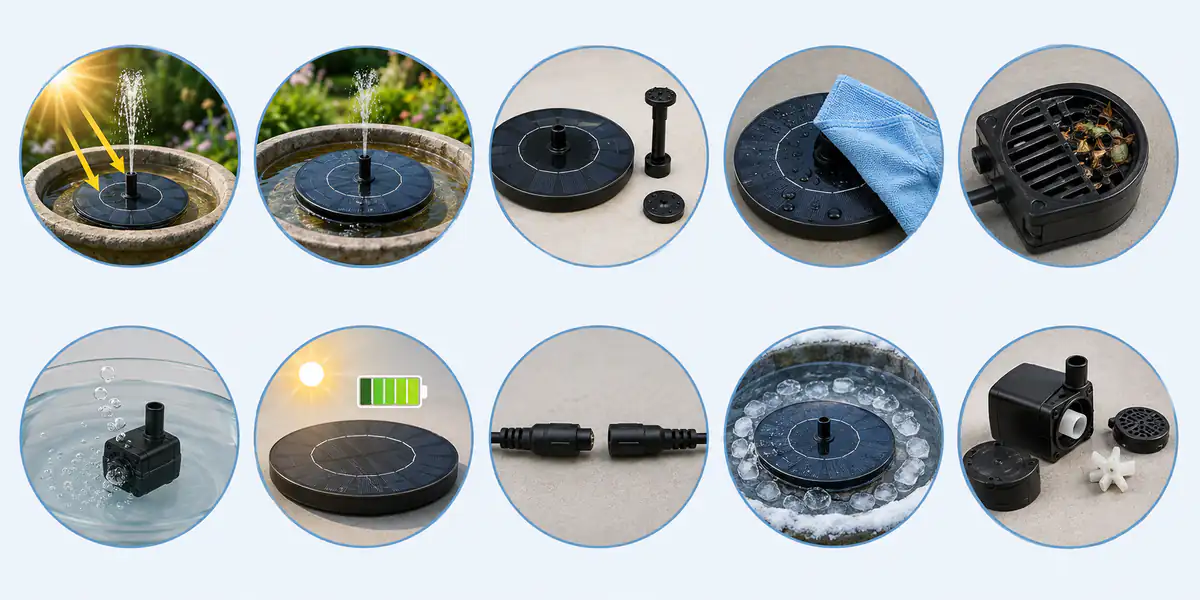
General troubleshooting illustration. Components and permitted service access depend on the model; the ice image indicates a hazard, not an approved operating condition.
If your solar bird bath fountain is not working, test the easiest causes first: direct sunlight, water level, a clean panel, and a clear pump intake. Many apparent failures come from weak light, trapped air, or debris rather than a damaged motor.
Do not take the housing apart immediately. Identify whether the fountain is direct-drive or battery-equipped and stop the pump as the model instructions require before handling it. Covering a panel can stop a direct-drive unit, but a charged battery can still power a battery-equipped pump. The sequence below moves from simple external checks to problems that may require supplier support.
Quick External Checks Before the Ten Problems
- Place the entire solar panel in strong, unobstructed midday sun.
- For the NEWSKYPOWER AS01A, AS10B, SP33D and SP32D fountains covered here, maintain at least 3 cm (about 1.2 in) of water at the pump location and keep the intake submerged. The operating depth must not fall below 3 cm.
- If the instructions permit it, remove the decorative nozzle and test the basic outlet.
- Wipe the solar panel with water and a soft cloth.
- Check the intake for leaves, algae, hair, feathers, or mineral debris.
- Lift and resubmerge the pump at an angle to release trapped air.
If it starts after one step, you have identified the likely cause. If it still does not run, continue through the ten problems below.
1. Insufficient Sunlight or Panel Shading
A direct-drive pump responds immediately to available solar power. Clouds, tree shadows, buildings, or even a narrow shadow across part of a compact panel can make the flow weak or stop it. This can look like an electrical fault when the system is behaving as designed.
Test under strong direct sun with the whole panel exposed. If the pump starts, improve the placement rather than replacing it. Battery models can buffer short changes only when they have useful stored charge. The cloud and shade guide explains this operating limit; the battery configuration guide helps buyers compare the available designs.
2. Water Level Is Too Low
A low level can expose the intake or prevent the pump from staying submerged. The result may be pulsing, noise, bubbles, weak flow, or no flow. Refill with clean water and keep the pump level.
Some products include dry-run or water-sensor protection, but do not assume every model has it. For these NEWSKYPOWER models, maintain an operating water depth of at least 3 cm (about 1.2 in) and refill before it falls below 3 cm. Do not test for protection by deliberately allowing the pump to run dry.
3. Air Is Trapped in the Pump
Air inside the impeller chamber can prevent a submerged pump from moving water. This is more likely after cleaning, refilling, or allowing the basin to run low. Stop power, keep the pump underwater, and tilt or gently move it as allowed by the instructions until bubbles escape. Then restart it without lifting the intake above the surface.
If the motor can be heard but no water emerges, remove the nozzle and repeat the process. A blocked outlet can create a similar symptom.
4. The Intake, Filter, or Nozzle Is Clogged
Pollen, feathers, algae, leaves, and mineral particles collect quickly in a shallow outdoor basin. A solar pump clogged at the intake may still hum while producing little water. A blocked nozzle may create an uneven or sideways spray.
Stop the pump according to the model instructions, remove only the parts identified as user-serviceable, and rinse away debris. Use a soft brush for small openings. Never force a wire through a nozzle if it may enlarge or damage the opening. Follow the safe fountain cleaning steps for the serviceable parts on the model.
5. The Solar Panel Is Dirty
Bird droppings, pollen, dust, hard-water spots, and dried spray reduce the light reaching the cells. This matters more on a compact fountain because the collection area is small.
Wipe the surface with clean water and a soft cloth. Avoid abrasive pads and harsh cleaners unless the manufacturer specifically permits them. If the pump improves immediately after cleaning, include the panel in routine maintenance.
6. The Fountain Is Tilted or the Pump Is Not Submerged
A sloped bowl can make a floating disc ground against one side or hold the pump at an angle. Stabilizing arms can also catch on an uneven rim. Level the basin, remove obstructions, and confirm that the intake remains underwater while the disc moves.
Do not add random weights on top of the panel. They can block cells, change flotation, or interfere with the intake.
7. The Battery Is Empty or Has Aged
For a battery model, several cloudy days or running the pump while charging can leave little stored energy. Follow the product instructions for charging in direct sun and for selecting the correct operating mode.
Rechargeable batteries also lose capacity with time and use. If the fountain works in current sun but no longer provides meaningful buffered or evening operation after adequate charging, contact the supplier. Do not open a sealed battery housing or assume the battery is user-replaceable. Ask for the service procedure for the exact model and version.
8. A Cable or Connector Is Loose
This problem mainly applies to separate-panel systems. Stop the system using its approved shutdown method, inspect accessible plugs, and reconnect them firmly according to the manual. Look for bent pins, corrosion, cracked insulation, or water in a connector.
Do not splice outdoor wet-location wiring or open a sealed housing without approved instructions. Replace a damaged cable or connector with a compatible supplier part.
9. Cold Weather or Freezing Caused Damage
Ice can block the impeller, expand inside a pump chamber, crack plastic, or damage seals. Never operate a frozen pump or use boiling water to thaw it. Stop the system according to its instructions, remove the unit if permitted, and let it thaw indoors.
Before freezing weather, follow the manufacturer's storage guidance. Drain and dry components that are not rated to remain outdoors in ice.
10. The Impeller, Motor, Controller, or Panel Has Failed
After the external checks, inspect only the user-serviceable impeller area described in the manual. A worn or broken impeller, damaged shaft, failed motor, controller fault, or cracked panel may require replacement.
Keep photos, model information, purchase date, and a record of the tests performed. This gives the supplier useful evidence and prevents repeated basic troubleshooting.
What a Weak Spray Can Tell You
A solar fountain weak spray often narrows the diagnosis. If flow improves when the nozzle is removed, clean the nozzle and outlet. If it improves in stronger sun, investigate shading or panel dirt. If it improves after cleaning the intake and impeller, debris was increasing pump load. If it remains weak under strong sun with a clean water path, the pump or power system may be deteriorating.
When a solar fountain stopped working suddenly, look for a new shadow, fallen leaf, low water, jammed impeller, or disconnected plug. Gradual decline more often points to accumulating dirt, mineral scale, battery aging, or mechanical wear.
Diagnose Before You Replace
When a solar bird bath fountain is not working, sunlight, water, air, and debris should be checked before parts are replaced. Work through the same order each time so changing weather does not confuse the result.
A clean panel, at least 3 cm (about 1.2 in) of operating water depth for these NEWSKYPOWER models, an open intake, and a free impeller resolve many common symptoms. When those checks fail, stop opening sealed components and use the model number and test record to request qualified support.
A Support Flow That Retailers Can Reuse
Use one sequence for a customer report and a returned sample: identify the model, confirm light and water conditions, check the external water path, repeat the observation, and then decide whether supplier review is needed. Do not ask the customer to open a sealed unit to obtain a diagnosis.
| Observation after an approved check | Next action | Record for the supplier |
|---|---|---|
| Runs in direct sun but stops in shade | Explain the light requirement; check battery mode only if fitted | Full-panel photo, time, weather and mode |
| Runs after refilling or releasing trapped air | Investigate water loss and placement | Basin depth, disc position and refill history |
| Improves after permitted cleaning | Review cleaning instructions and maintenance | Removed debris, parts cleaned and before/after flow |
| Remains stopped under suitable conditions | Stop repeating the same test and request model-specific guidance | All completed checks, model label and a short video |
| Has a cracked housing, exposed wiring or visible battery damage | Stop use and ask the supplier how to handle the unit | External photos; do not dismantle it for a photo |
This table is a communication aid, not an automatic warranty decision. “No flow” is a symptom, and “defective motor” is a diagnosis that needs evidence. A product that works after moving out of shade should not be counted as the same failure as a damaged pump.
If a customer repeatedly loses water, direct them to the nozzle, centering and overspray checks. If standing water remains while a unit is out of service, continue normal basin cleaning; a stalled fountain does not provide continuous mosquito control.
What to Put in a Distributor's Support Ticket
Start with the actual product label and order reference. Record the model, batch reference if available, date first used, time until the symptom appeared and whether it is continuous or intermittent. Keep reports from different models and batches separate even when the complaint sounds similar.
Ask for a short video showing the whole fountain, water level and panel exposure. Add the selected nozzle and operating mode, recent weather, charging conditions for a battery model, and the result of each permitted check. Record “not checked” where evidence is missing; it is more useful than assuming the customer completed every step.
For a returned sample, photograph its condition before cleaning, then record what changed after cleaning and retesting. Do not infer a batch-wide failure rate from a few messages without the corresponding quantity supplied, quantity actually checked and consistent fault classification. Agree any return, repair or replacement action with the supplier under the applicable order terms.
Confirm the Support Process Before a Bulk Order
During sample approval, ask a colleague to follow the supplied instructions without verbal assistance. Can they identify the model, find the shutdown procedure, choose the right operating mode, clean approved parts and prepare a usable support record? Note unclear wording and request corrections before approving a manual for the order.
Confirm which components, if any, are available as compatible service parts and whether replacement belongs with an end user, a trained service provider or the supplier. Ask for part references, ordering conditions and the relevant service document. Do not promise customers interchangeable pumps, user-replaceable batteries or a fixed replacement period without confirmation.
For an existing NEWSKYPOWER unit, get model-specific fountain support and begin the message with “After-sales support,” followed by the ticket information above. If the product is another brand, contact its original supplier; a general troubleshooting article does not make NEWSKYPOWER that brand's authorised repair service.
For a new purchase, use the solar fountain buying guide to compare models, then discuss after-sales support for bulk orders. Include the target market, models from the fountain range, expected quantity, manual languages and spare-part questions. Label this enquiry “Bulk procurement” so it is distinguishable from an existing-product repair request.
Frequently Asked Questions
Solar Fountain Pump Not Working in Full Sun?
For the NEWSKYPOWER models covered here, confirm that water at the pump is at least 3 cm (about 1.2 in) deep and does not fall below 3 cm during operation. Then remove the nozzle, release trapped air and clean accessible parts only as the model instructions allow. Keep the panel clean. If those steps fail, check accessible connections and contact the supplier.
Why does the pump run but no water comes out?
The pump may contain air, or the intake, outlet, tube, or nozzle may be blocked. Keep it submerged, release bubbles, and test without the nozzle.
Can I use vinegar to clean the pump?
Use only a dilution and contact method allowed by the product instructions. Diluted vinegar can help with mineral deposits on some basins and removable parts, but do not soak batteries, electronics, or unknown seals.
Should I replace the battery or the entire fountain?
First confirm that poor charging is not the cause. For sealed integrated products, contact the supplier because routine user battery replacement may compromise waterproofing.
When should I replace the pump?
Replacement is reasonable when the clean, submerged pump receives proper power but the motor or impeller cannot run, compatible service parts are unavailable, or repair would compromise electrical or waterproof safety.
Should a retailer classify every stopped fountain as defective?
No. Record the symptom and test conditions first. Insufficient sunlight, water loss, trapped air and debris can resemble component failure. A supplier should assess unresolved cases using the model and evidence.
What should a customer video show?
Show the whole panel, water level, disc position, nozzle and operating mode where visible. Record the symptom without dismantling the product or deliberately running it out of water.
Does covering the panel switch off a battery fountain?
Not necessarily. Stored battery energy may still run the pump. Follow the model's shutdown instructions before cleaning or handling moving parts.
What spare parts should a distributor request?
Ask which parts are approved and available for the exact model and version. Confirm identification, fitting requirements, who may replace them and order terms. Appearance alone does not establish compatibility.
How should a bulk buyer assess the supplied troubleshooting manual?
Ask a colleague to use it with the approved sample. Check that the instructions identify operating conditions, safe shutdown, permitted cleaning and the evidence needed for support. Resolve unclear steps before approving the manual.